Encore
Reply with an offer after a post goes out, and relay posts to your other accounts.
Open Encore
Open Calendar and choose Encore. Everything that happens after you post is set here.
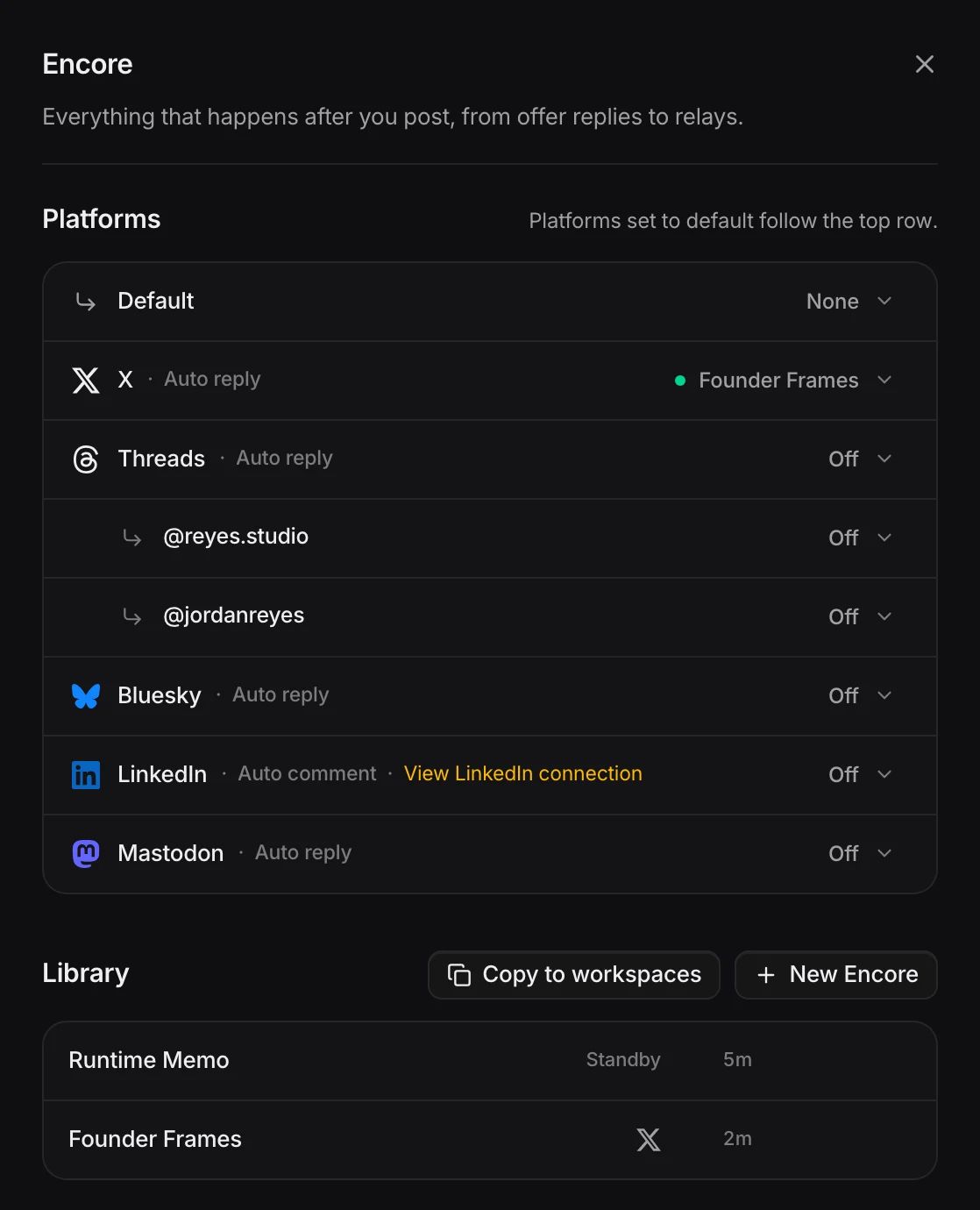
Reply with an offer
An Encore is a reply that links to something you promote, such as a product, an event, or your newsletter. Distinctful adds it under your eligible published posts. On LinkedIn it goes out as a comment.
- Under Library, choose New Encore and write the reply with its link.
- Under Platforms, choose which Encore each platform or account uses, or leave it Off.
- Set Default to give every platform the same Encore. A platform left on default follows that top row.
Each link you promote is kept as an offer, with its type and price.
Note. Distinctful does not process payments or track your sales.
Set the rules
- Pace sets how often an account gets an Encore, from every post to only posts that take off.
- By topic gives tagged posts their own Encore. Choose Add topic to add a rule. The highest row wins.
Relay a post to other accounts
Choose New relay to post once and have Distinctful post it on your other accounts too. A relay copies the post exactly as it went out. When the post would not look the same on an account, Distinctful skips that account and tells you why.
On a team
The owner and Leads change Encore. On Scale, the owner can choose Copy to workspaces to copy Encores to other workspaces on the plan. A client can approve an Encore’s wording on a review link.