Analytics
See how each post did and which kinds of posts are working.
Review your posts
- Open Analytics. Posts lists your published posts, newest first.
- Select a post to see its numbers on each platform it went to.
- Use the left rail to filter by platform, account, or tag.
Under each post you also see how it compares with your usual, such as 2.6× usual reach.
Note. Each platform reports numbers on its own schedule. A post shows when its metrics were last read.
See overall performance
Choose Performance to see reach, engagement rate, posts, and follower growth across your connected accounts. Switch between 30 and 90 days. By account compares each account side by side.
A newly connected account fills in after its first sync. Bluesky and Mastodon do not share reach, so their posts are not counted in reach totals.
Tag posts to see what is working
You choose the tags. A tag can be a theme, a format, or anything else you want to compare.
- In Analytics, use + beside Tags to create a tag.
- In the composer, open Tags and add one or more to a draft.
- Open Performance and scroll to Performance by tag.
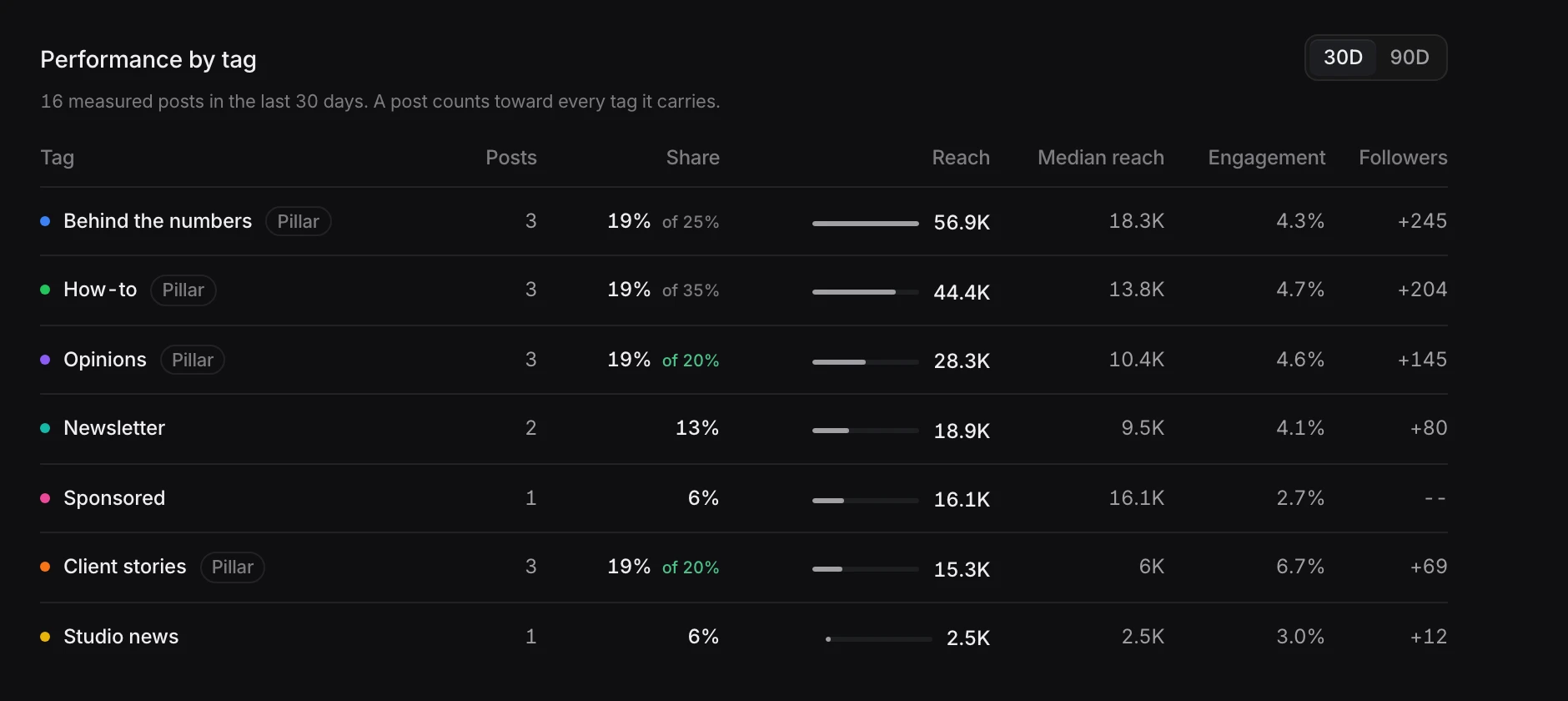
A post counts toward every tag it carries. A tag marked Pillar has a target share of your posts, which you set under Settings → Strategy.
Share results with a client
On Scale, choose Client report to share a dated snapshot. See Client reports.