Can ChatGPT or Claude Schedule Your Social Media Posts?
ChatGPT and Claude schedule social posts only through a connected scheduler, and ChatGPT limits that by plan. Compare Distinctful, Buffer, Hootsuite, and more.
ChatGPT and Claude can write your social posts, but neither can post on its own. They schedule and publish through a connected social media scheduler. In ChatGPT, custom connectors can take actions like scheduling only on Business, Enterprise, and Edu plans. Buffer, Hootsuite, Post Bridge, Postpone, and Distinctful offer connectors, and Distinctful's plans each week from your strategy and results.
Pick by the work you want the assistant to do. Choose Buffer if you want a connection on a free plan, Post Bridge if you post a lot of video, and Hootsuite if your team already approves posts there. Choose Distinctful if you are one person marketing a business and want the assistant to decide what to post from your offers, voice, and past results, then schedule it when you say so.
Which tools let ChatGPT or Claude schedule your posts?
Distinctful publishes this guide and is one of the options. Each row comes from the vendor's own setup or help page, checked on October 29, 2026. "Not documented" means the page we checked does not say; the feature may still exist.
| Tool | Works in ChatGPT | Works in Claude | Can schedule | Can publish now | How you connect |
|---|---|---|---|---|---|
| Distinctful | Yes, app directory or custom connector | Yes, custom connector | Yes | Yes | OAuth sign-in, no API key |
| Buffer | Yes, custom app in Developer mode | Yes | Yes | Yes, in its API reference | OAuth or personal API key |
| Hootsuite | Yes, per its MCP page | Yes, custom connector | Yes | Yes, per its Claude guide | OAuth sign-in |
| Post Bridge | Yes, plugin or custom connector | Yes, same connector | Yes | Yes | OAuth sign-in |
| Postpone | Yes, custom app in Developer mode | Yes | Yes | Not documented | OAuth, or API key for some clients |
| Typefully | Yes, in Developer mode | Yes, Pro or Max | Yes | Not documented | OAuth sign-in |
Sources: Distinctful MCP tools, Buffer MCP, Hootsuite's Claude guide, Hootsuite MCP, Post Bridge's ChatGPT guide, Postpone MCP, and Typefully MCP.
In ChatGPT, your plan decides what a connector can do. OpenAI's Developer mode guide gives custom MCP connectors full access, including actions that create or change data such as scheduling, on Business, Enterprise, and Edu plans, and read-only access on Pro. Apps listed in ChatGPT's app directory follow their own availability, so check what your plan allows before you rely on scheduling from ChatGPT.
Do ChatGPT scheduled tasks publish social posts?
No, not on their own. A scheduled task runs the assistant on a timer. OpenAI's scheduled tasks help page describes tasks that run once or on a repeat, such as a reminder or a daily briefing. Claude's scheduled tasks in Cowork work similarly on paid plans, running remotely with your connectors.
Both schedule the assistant's work, such as "every Friday, draft next week's posts." Publishing a post at a set time is the scheduler's job. Post Bridge, for example, says a post scheduled from ChatGPT publishes at the chosen time and records a result for each platform. A useful pattern is a recurring task that saves drafts through your scheduler's connector, with scheduling left as a separate request after you read them. That is our recommendation, not a vendor requirement.
Distinctful: for planning posts from your own business
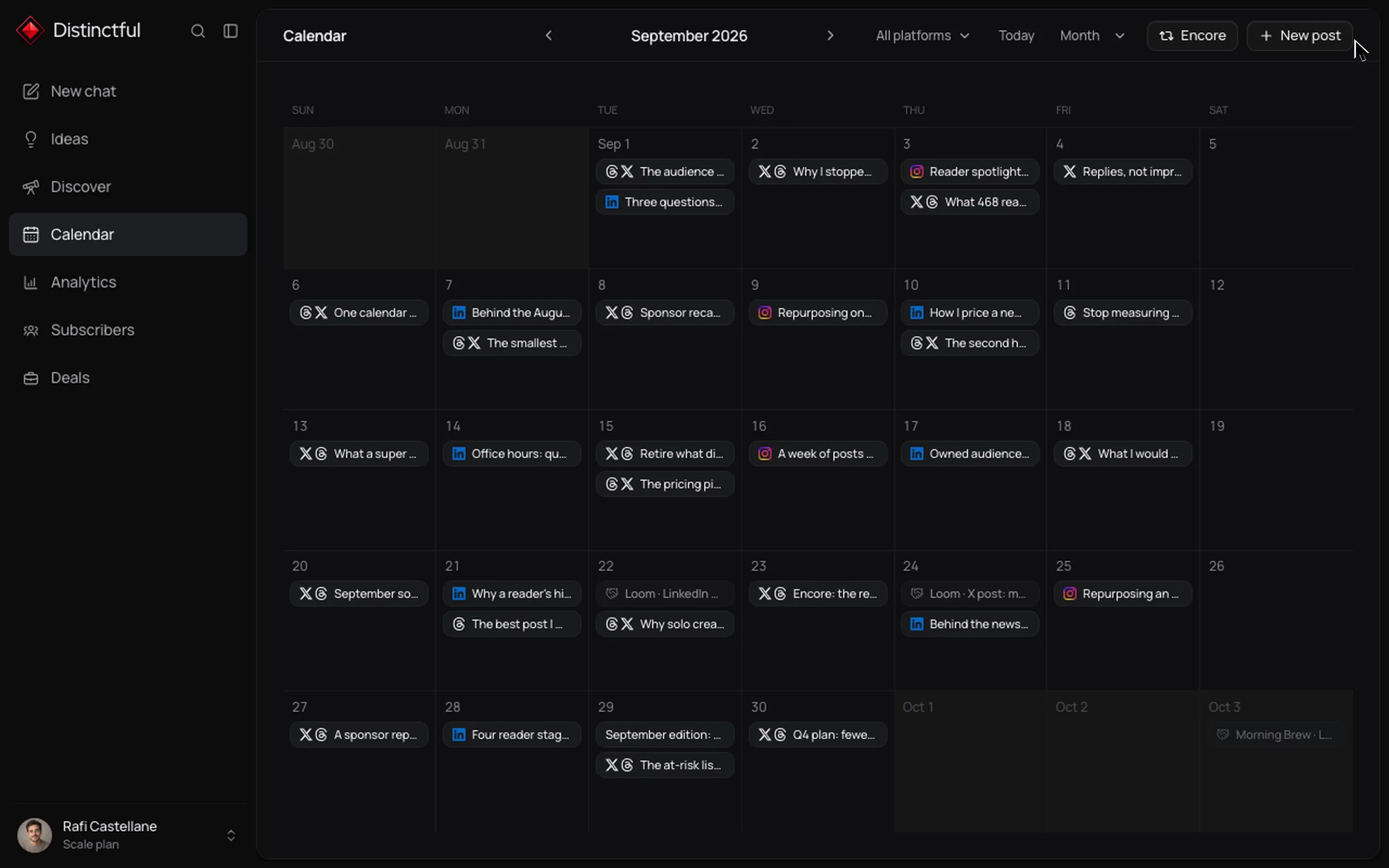
Best for one person marketing a business who wants the assistant to work from real context before it schedules. Distinctful is a social media scheduler for entrepreneurs: it plans and drafts each week from your offers, your voice, and what already worked, and keeps strategy, posts, and results together.
- In ChatGPT, open Settings, then Apps, find Distinctful in the directory, choose Connect, and sign in. In Claude, add
https://app.distinctful.com/api/mcpas a custom connector. Both use Distinctful sign-in (OAuth), so you never paste an API key. See the ChatGPT setup and Claude setup. - The MCP tool reference lists
create_draft,plan_post(dates a draft for review),schedule_post(scheduling again moves it), andpublish_now. - The MCP server page covers LinkedIn, X, Instagram, Threads, YouTube, and Bluesky. YouTube is in beta.
- MCP is included on Grow, which is $49 a month or $39 a month billed yearly as of October 2026, with 12 social accounts and a 7-day free trial (pricing).
On Scale, an assistant connected by a teammate can draft and plan but cannot schedule or publish; the owner does. Limits: there is no free plan and no engagement inbox. In ChatGPT, scheduling through a connector depends on your ChatGPT plan, as described above.
Buffer: for an assistant connection on a free plan
Best for people who already know what to post and want to queue it across many channels. Buffer's MCP page says MCP access is included on every plan, including Free, and lists Claude, ChatGPT, Cursor, Perplexity, Notion, Zapier, and n8n among supported tools.
- ChatGPT setup uses Developer mode: add an app with the server URL
https://mcp.buffer.com/mcpand OAuth (Buffer's ChatGPT integration). - Buffer's MCP reference says
create_postschedules or publishes on one channel, with modes including add to queue, share now, and a custom time, across networks such as Instagram, LinkedIn, Threads, Bluesky, and Pinterest. - The same reference offers a
notificationscheduling type, which sends you a reminder to post manually instead of publishing automatically.
Limitation: Buffer's marketing page says assistant posts land in your queue for review, while its reference includes an immediate share mode. Tell the assistant which one you want and check the result.
Hootsuite: for teams that already approve posts there
Best for teams whose approvals and inbox already live in Hootsuite. Its Claude guide, dated October 2, 2026, adds https://mcp.hootsuite.com/perch as a custom connector for planning and publishing, signed in with OAuth.
- Separate servers cover Nest (customer conversations), Lumen (social listening), and Parliament (employee advocacy).
- Hootsuite says Claude follows the same permissions and approval workflows your team already uses, and does not run your accounts on autopilot.
- Its MCP page names ChatGPT, Claude, Gemini, and Copilot.
Limitation: Hootsuite is built around teams; check that your plan includes MCP access before you connect.
Post Bridge: for ChatGPT users who post video
Best for ChatGPT users who want a directory plugin and video uploads. Post Bridge's ChatGPT guide opens with "ChatGPT cannot publish to social media on its own," then installs a plugin that posts text, images, and video to 10 platforms, now or scheduled.
- Install it from ChatGPT's plugin directory or add
https://www.post-bridge.com/api/mcp/mcpas a custom connector. The same connector works in Claude. - Say "now" to publish immediately or "save as a draft" to review in the dashboard. ChatGPT asks permission the first time it writes.
- For video on your device, ChatGPT requests an upload link that lasts 24 hours and accepts files up to 500MB.
Limitation: Post Bridge says Instagram posting needs a professional (business or creator) account.
Postpone and Typefully: for text-first schedulers
Best for writers who mostly post text and want a conversation-driven queue. Postpone's ChatGPT guide connects https://api.postpone.app/mcp over OAuth. Its agents can create and schedule posts, fill the next open queue slot, and read analytics.
Typefully's MCP server creates, edits, and schedules drafts on X, LinkedIn, Threads, Bluesky, and Mastodon. Typefully lists Claude Pro or Max and ChatGPT Developer mode as supported setups; in ChatGPT, OpenAI's plan limits on write actions still apply. Limitation for both: the pages we checked do not document immediate publishing through MCP.
Can ChatGPT post directly to Instagram or LinkedIn?
No. ChatGPT has no access to your Instagram or LinkedIn accounts until you connect a scheduler that holds them, and the scheduler does the posting. Account type still matters after that: Post Bridge notes Instagram posting needs a professional account. Before scheduling in Distinctful, ask the assistant to list your connected accounts; the account tool reports whether each one can publish now.
What is the difference between drafting, planning, and scheduling?
Drafting saves text, planning gives it a date for review, and scheduling tells the scheduler to publish it at a set time. Only scheduling and publishing put a post in motion.
| Step | Distinctful tool | What happens |
|---|---|---|
| Draft | create_draft |
Text is saved, nothing is dated |
| Plan | plan_post |
The draft sits on your calendar for a date and platforms |
| Schedule | schedule_post |
The post will publish at the time you set |
| Publish | publish_now |
The post goes out right away |
Other tools draw similar lines. Buffer has a save-to-draft option and separate scheduling modes, and Post Bridge separates "save as a draft" from a time or "now." The Claude scheduling walkthrough shows each step with a sample LinkedIn post.
How do you keep an assistant from publishing something you did not approve?
Ask for drafts or a calendar plan, then schedule the approved posts yourself. In Distinctful, ask it to plan the post onto your calendar and schedule it from the app. Plain instructions help too: "Save these as drafts. Do not schedule or publish anything."
Do not count on a single confirmation screen. Buffer's reference says most MCP clients ask you to approve write tools, and Post Bridge says ChatGPT asks the first time, with a choice to allow always. In Hootsuite, existing approval workflows still apply. To remove an assistant's access to Distinctful, revoke it under Settings, Integrations, connected agents; access ends within a minute.
How do you connect Distinctful to ChatGPT or Claude?
- Start a Grow or Scale trial and connect your social accounts in Distinctful.
- In ChatGPT, open Settings, then Apps, find Distinctful, choose Connect, and approve access. In Claude on the web or desktop, open Customize, then Connectors, choose Add custom connector, and paste
https://app.distinctful.com/api/mcp. - In ChatGPT, pick Distinctful from the + menu or type @Distinctful. In Claude, turn the connector on in the chat.
- Ask it to read your connected accounts and plan the week before you schedule anything.
The MCP server guide explains the connection and access model.
How to decide this week
Start with your networks. Distinctful publishes to Threads, X, LinkedIn, Bluesky, Instagram, and YouTube (in beta); if you need networks beyond those, Buffer or Post Bridge covers more. If your team's approvals already live in Hootsuite, connect Hootsuite. If you know your networks and the hard part is deciding what to say, try Distinctful on one real post: read accounts, draft, plan, schedule, then check the live post after it goes out.
For a closer look at what each server exposes, see social media MCP servers compared. To turn existing writing into posts first, see how to repurpose a blog post with Claude.
Questions
Can ChatGPT or Claude schedule and publish my social media posts for me?
Yes, once you connect a social media scheduler that holds your accounts through an app, connector, or MCP server. On their own they only write text. In ChatGPT, custom connectors can take actions like scheduling only on Business, Enterprise, and Edu plans. Distinctful, Buffer, Hootsuite, Post Bridge, and Postpone document connectors, and in Distinctful the assistant can save drafts, plan dates, schedule, or publish now when you ask.
Do ChatGPT scheduled tasks publish social media posts?
Not by themselves. A scheduled task runs a ChatGPT prompt at a set time or on a repeat. Publishing a post at a set time is the job of a connected scheduler such as Buffer or Distinctful.
Can ChatGPT post directly to Instagram or LinkedIn?
No. ChatGPT needs a connected scheduler that holds your Instagram or LinkedIn account, and that scheduler publishes the post. Post Bridge notes that Instagram posting requires a professional account.
How do I stop an AI assistant from publishing without my approval?
Ask it to save drafts or plan posts onto your calendar, then schedule the approved versions yourself. In Distinctful, an assistant connected by a Scale teammate cannot schedule or publish, and you can revoke any connected agent from Settings.
Which scheduler works with both ChatGPT and Claude?
Distinctful, Buffer, Post Bridge, Postpone, and Typefully document setups for both. In ChatGPT, what a connector can do depends on your plan. Distinctful connects through Distinctful sign-in with no API key and is included on Grow at $49 a month or $39 a month billed yearly, as of October 2026.
One draft, every platform.
Distinctful turns one idea into native posts for X (Twitter), LinkedIn, Threads, and Bluesky, so publishing everywhere stops being a second job.
Related posts
How to Repurpose a Blog Post With Claude
Repurpose a blog post into social posts with Claude by supplying the article, choosing distinct angles, checking claims, and reviewing drafts before posting.
Social Media Schedulers That Support Threads and Bluesky
Buffer, Metricool, Publer, Hootsuite, Typefully, Fedica, Postiz, and Distinctful publish to both Threads and Bluesky. Compare threads, free plans, and prices.
How to Schedule Social Media Posts With Claude
Connect Claude to a social scheduler, choose the right account and time zone, review a complete draft, and verify the schedule before calling it published.