How Busy Founders Stay Consistent on Social Media, and Which Tools Help
Busy founders stay consistent with a weekly planning session, an idea backlog, and a queue. See which tools fix each bottleneck, from Buffer to Distinctful.
Busy founders stay consistent by planning weekly, keeping an idea backlog, batching drafts, and letting a scheduler publish the queue. Match the tool to the bottleneck: Buffer for a posting queue, MeetEdgar or SocialBee for recycling evergreen posts, and Distinctful when the blank page is the problem, since its Chat drafts your week from your offers and past results.
Choose Buffer when you already write posts and they just need to go out on time. Choose MeetEdgar or SocialBee when you have a library of evergreen posts worth repeating. Choose FeedHive for AI drafting with recycling suggestions, and Predis.ai or Apaya if you would rather review AI-generated posts than write them. Choose Distinctful when you sell something and the hard part is deciding what to say each week.
Which tool fixes which consistency problem?
Falling off a posting routine usually traces back to one step: finding ideas, drafting, publishing, or reusing what worked. Find the step where your week breaks, then pick the tool type built for it.
| Your bottleneck | What helps | Tools that document it |
|---|---|---|
| Posts are ready but go out late | A queue with recurring time slots | Buffer, MeetEdgar |
| Good posts disappear after one day | Recycling evergreen posts | MeetEdgar, SocialBee, FeedHive |
| Ideas run out midweek | One idea backlog you plan from | Buffer (Ideas), Distinctful (Ideas) |
| Drafting takes too long | AI drafting that knows your business | Distinctful (Chat), FeedHive |
| No time to write at all | AI generation with automatic posting | Predis.ai (Rise and above), Apaya |
| Meetings swallow the week | Planning beside your real calendar | Distinctful (Google Calendar overlay) |
Distinctful publishes this guide and is one of the options. Tool facts below come from each vendor's own pages as of October 29, 2026.
A suggested weekly routine for a busy founder
This is a suggested starting routine, not a measured result. It takes about two hours a week, most of it in one sitting, plus a few seconds whenever an idea shows up. Adjust the time boxes to your calendar.
- Capture, a minute at a time, all week. When a customer asks a sharp question, you make a call, or something breaks, add one line to a single idea list. That list is your backlog.
- Review, 15 minutes on Monday. Look at last week's posts and note which ones beat your usual. Those point to topics worth repeating.
- Plan, 15 minutes. Pick three ideas from the backlog for this week. Check your calendar so posts land on days you can reply to comments.
- Draft, 45 to 60 minutes. Write all three posts in one sitting, or ask an AI tool for first drafts and spend the time editing. Read each one aloud before you save it.
- Queue, 10 minutes. Schedule the week and close the tab. You do not need to open a social app again until replies come in.
- Reuse, 10 minutes on Friday. Pick one older post that performed, rewrite the hook, and schedule it for next week.
Three posts a week from one session is a modest target on purpose. Raise it after you have kept it for a month.
Which tools help a busy founder stay consistent?
Each tool below fits a different bottleneck. Prices and limits change often, so confirm them on the linked vendor page before buying.
Buffer: best for a simple posting queue
Best for founders who already write posts and need them to go out on time. Buffer's publishing tools let you set a recurring posting schedule, drop a post into the next open slot, and let Buffer publish it from the queue.
Buffer's pricing page lists a Free plan with up to 3 channels and 10 scheduled posts per channel at a time; slots free up as posts publish. Essentials is $5 per channel a month billed yearly, as of October 2026, with unlimited scheduled posts and a 14-day free trial. The AI Assistant for creating, refining, and repurposing content is included on every plan, and Ideas stores up to 100 ideas on Free.
Limitation: a queue does not tell you what to write. If it stays empty for two weeks, your bottleneck is drafting, and scheduling alone will not fix it.
MeetEdgar: best for recycling an evergreen library
Best for founders who already have posts that stay useful for months, such as tips, guides, and answers to common questions. How MeetEdgar works: you group posts into categories, set weekly time slots, and Edgar publishes from your content library automatically. Its AI assistant, Inky, writes captions and hashtags.
On MeetEdgar's pricing page, the Eddie plan is $29.99 a month as of October 2026, with 5 social accounts, 4 content categories, and 10 weekly automations, which MeetEdgar defines as weekly time slots for your categories. The Edgar plan is $49.99 a month with 25 accounts and 1,000 weekly automations. Every plan starts with a 30-day free trial.
Limitation: recycling only helps once the library exists. A founder starting from zero still has to write the first few dozen posts.
SocialBee: best for scheduling by content category
Best for founders who want a mix of post types (tips, product news, behind the scenes) kept in balance automatically. SocialBee's pricing page lists content categories, a sharing cadence you plan for each profile, Recycle content for top-performing or evergreen posts, and Expire content to retire a post after a set number of shares or a date.
Bootstrap is $29 a month as of October 2026, with 5 social profiles, 10 content categories, unlimited AI content generation, and a 14-day free trial.
Limitation: categories pay off only after you define them and fill each one, so plan a setup session before your first week.
FeedHive: best for AI drafting with recycling suggestions
Best for founders who want AI writing help and recycling in one tool. FeedHive's homepage says it learns your voice, audience, and goals to generate content, suggests your best posts to recycle, and uses posting plans and post conditions to keep channels active.
FeedHive's pricing page lists a 7-day free trial and plans priced by the number of social accounts, with a discount for yearly billing.
Limitation: FeedHive describes learning your voice, audience, and goals; check during the trial whether its drafts know your offers well enough to promote them.
Predis.ai and Apaya: best when you want AI to write and post
Best for founders who would rather review AI-generated posts than write them. Predis.ai's pricing page lists Auto Posting on Rise and higher plans: on Rise, its AI generates up to 2 posts a day per brand that you can review before publishing. The entry Core plan has no auto posting, and every plan starts with a 3-day free trial.
Apaya's pricing page lists Spark at $69 a month, or $55 a month billed yearly, as of October 2026, for 1 brand and 4 social accounts. Spark includes a brand framework that learns your voice and style from your website, plus Post Autopilot to schedule and publish automatically. Apaya offers a 3-day free trial.
Limitation: both tools start from your brand details or website. This week's customer questions, decisions, and mistakes still have to come from you, so review each post before it goes out.
Distinctful: best when deciding what to say is the bottleneck
Best for founders who sell something and lose the most time deciding what to post. Distinctful is a social media scheduler for entrepreneurs. It plans and drafts each week from your own business (your offers, your voice, and what already worked) and keeps strategy, posts, and results together.
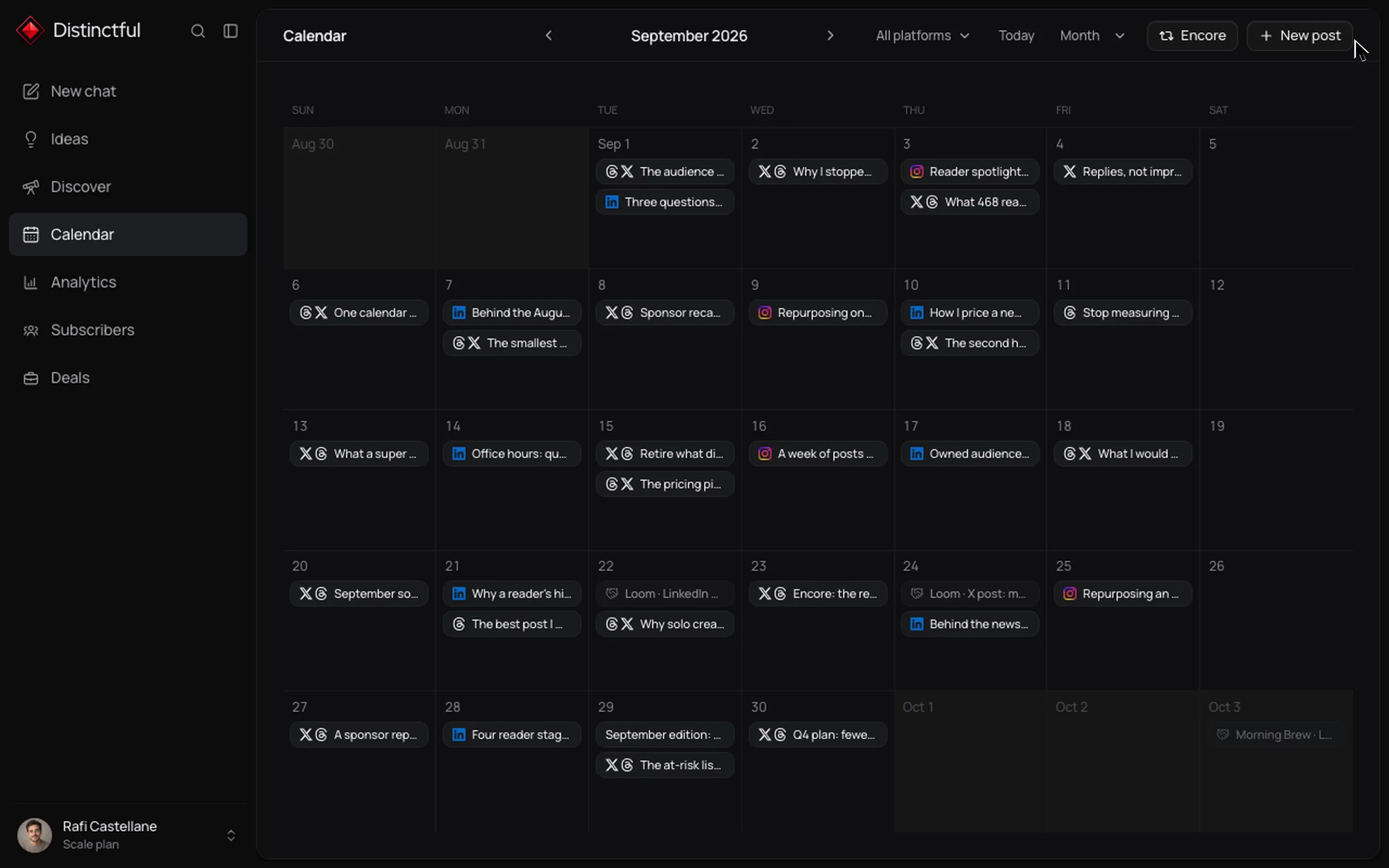
- Chat plans the week. Chat, Distinctful's AI creative strategist, works from your saved strategy, offers, ideas, and how your posts performed. It suggests what to post next, writes drafts in the voice of your recent posts, and places them on your calendar. Nothing publishes until you approve it.
- One backlog and one calendar. Ideas keeps your notes and saved posts next to a calendar that covers Threads, X, LinkedIn, Bluesky, Instagram, and YouTube (in beta). Connect Google Calendar and your meetings appear as read-only context while you plan.
- Reuse and promotion. Analytics keeps each published post beside its performance and compares it with your usual, which makes the Friday reuse step quick. Encore can add an automatic reply under a published post that links to your offer a few minutes after it goes live; it does not repost anything.
- Planning from ChatGPT or Claude. Connect Distinctful through MCP and ask your assistant to plan the week. It reads your strategy, offers, recent results, calendar, and ideas, creates dated drafts once you approve them, and can schedule a draft when you ask.
Grow is $49 a month, or $39 a month billed yearly, with 12 social accounts, unlimited social posting, and 125 AI credits a month. Every plan starts with a 7-day free trial; see Distinctful pricing.
Limitation: Distinctful does not recycle posts automatically, and there is no free plan. Reusing a winner means rewriting it and scheduling it again. If a hands-off evergreen queue is what keeps you posting, MeetEdgar or SocialBee fits better.
How often should a busy founder post?
Pick a cadence you can keep every week for three months, then raise it. For many founders, a sustainable starting point is three posts a week on one or two platforms.
Our guide on how often to post on social media as a solopreneur gives per-platform ranges and a four-week way to find your number. The free content cadence planner works out how many posts one person can sustain from the hours available and the platforms in play.
A smaller number you keep gives you comparable weeks to learn from. A burst followed by a gap gives you very little.
What do you post when you have nothing to say?
Post what your week already produced. A founder's week generates more usable material than it seems to from the inside:
- A customer question and the answer you gave
- A decision you made and the reason behind it
- Something that broke and what you changed
- A product update framed around the problem it solves
- A lesson from a sales call, with the customer's details removed
Keep these in one list with a short note on the angle, as described in how to organize content ideas into a usable backlog. Planning then starts from a list instead of a blank page. When the list runs thin, run a post that already worked with a new hook; Distinctful's guide on giving a proven post another run walks through it.
Should you batch content?
Yes, for most busy founders. Writing three posts in one sitting means switching into writing mode once a week instead of every morning, which is the main reason batching tends to survive a busy calendar.
Batching works best with a view of the whole week, so gaps and pile-ups are visible before Monday. The guide to planning a week of content shows that flow on one calendar. Leave one open slot for something timely, such as a launch or a customer story that just happened.
What should you stop doing to stay consistent?
Stop doing the things that make each post expensive:
- Posting everywhere. Pick one or two networks where your customers already spend time.
- Writing on the day it publishes. Same-day writing competes with every meeting and support ticket.
- Waiting for a big idea. A small, specific post about this week still counts as a post.
- Checking metrics daily. Review once a week, in the Monday slot.
- Buying features you will not use this quarter. A backlog and a queue cover most of the routine.
How to decide this week
Run the routine once with what you already have, even a notes app and a calendar reminder. Then look at where it broke:
- Posts were ready but went out late: start with Buffer's free plan.
- You had good older posts and nothing new: try MeetEdgar's 30-day trial or SocialBee's 14-day trial.
- The drafting hour was the hard part: try Distinctful's 7-day trial, add your offers, and ask Chat to plan next week. FeedHive's 7-day trial is another option.
- You never reached the drafting hour: look at Predis.ai or Apaya, and keep the review step.
Give the tool two full weeks before judging it. One week mostly measures setup.
Questions
I'm a busy founder and can't stay consistent posting on social media. What tool would actually help?
The tool that helps is the one that fixes your bottleneck. If posts are written but go out late, a queue scheduler like Buffer helps, and if you have evergreen posts worth repeating, MeetEdgar or SocialBee can recycle them. If deciding what to say is the hard part, Distinctful's Chat plans and drafts your week from your strategy, offers, and past results, and nothing publishes until you approve it.
How often should a busy founder post on social media?
Choose a number you can hit every week for months, and raise it only after you have kept it for several weeks in a row. For many founders, a sustainable starting point is three posts a week on one or two platforms.
What should a founder post when there is nothing new to say?
Use what the week already produced: a customer question, a decision and the reason behind it, something that broke, or a product update. Keep those in one idea backlog so planning starts from a list. A post that already performed well can also run again with a rewritten hook.
Should founders batch their social media content?
Batching suits most busy founders because it turns many small daily writing tasks into one weekly session. A suggested routine is about 90 minutes of planning and drafting once a week, with the posts queued in a scheduler such as Buffer, MeetEdgar, SocialBee, or Distinctful. Leave one slot open for something timely.
Can an AI tool post on social media for me automatically?
Some tools can. Predis.ai lists Auto Posting on its Rise plan and above, and Apaya lists Post Autopilot on its Spark plan, both working from your brand details. Distinctful drafts from your strategy, offers, and results, and those drafts wait on your calendar until you schedule or publish them.
Plan the work once. Ship it all week.
Distinctful keeps ideas, drafts, and the calendar in one place, so the plan and the publishing never drift apart.
Related posts
How to Turn Customer Questions Into Social Posts With AI
Turn customer questions into social posts with AI: remove private details, group distinct questions, check your evidence, and save original drafts for review.
How to Give an AI Assistant Your Brand Voice
Give an AI assistant your brand voice with real writing samples, clear rules, and business context. Test drafts against evidence before saving instructions.
How to Build a Weekly Social Content Plan With Claude
Build a weekly social content plan with Claude using your strategy, recent results, and calendar. Approve useful proposals, then save dated drafts for review.