How to Schedule X Posts and Threads, and Which Schedulers Still Support X
Schedule X posts natively in X Pro or the X Ads Composer, or use a scheduler. See which tools still support X and threads, on which plans, and any X fees.
By Azande Porter
You can schedule X posts natively in X Pro, which X's help center lists as a Premium+ feature, or in the X Ads Composer; X does not document scheduling a multi-post thread natively. For threads, or for X beside other networks, use a scheduler: as of October 29, 2026, Buffer, Metricool, Hootsuite, Typefully, SocialBee, Publer, and Distinctful support X, while Later ended X support on August 28, 2025.
The details differ by plan. Metricool charges an add-on per X account, Publer keeps X off its free plan, and Buffer's free plan schedules one thread at a time. The sections below cover each, with links to the vendor's own page.
Can you schedule posts on X without another tool?
Yes, in two places X documents.
- X Pro. X's advanced X Pro features page says "X Pro allows you to schedule posts in advance," including for each account you manage there. You click Schedule post, pick a date and time, and view or edit scheduled posts by adding a Scheduled column. X's Premium page lists "Access to X Pro" under features only for the Premium+ tier.
- X Ads Composer. X's scheduled posts guide walks through scheduling in the Composer at ads.x.com: write the post, open the dropdown next to Post, pick a date and time, and choose Schedule. It covers organic and Promoted-only posts, and you manage them from the Posts tab by switching the filter to Scheduled.
X's help center does not publish a scheduling guide for the standard x.com composer. Its post types page notes that "currently you cannot save a draft or schedule a longer post on web." Longer posts, beyond 280 characters, require an X subscription.
Threads are the bigger gap. X's thread guide explains how to build a thread, publish it with Post all, and save it as a draft. None of the X help pages we checked document scheduling a thread. If you want a thread to go out while you are busy, that is the main reason to use a scheduler.
Which schedulers still support X?
Distinctful publishes this guide and is one of the options. Each row comes from the vendor's own pricing or help page, checked on October 29, 2026. "Not documented" means the page we checked does not say; the feature may still exist.
| Scheduler | X on which plans | Multi-post X threads | X-specific limits or fees |
|---|---|---|---|
| Distinctful | Every plan: Grow $49 a month ($39 billed yearly), Scale $99 a month ($79 billed yearly) | Yes, published in order | Up to four images or one video per post; no free plan |
| Buffer | Free (3 channels), Essentials, and Team | Yes, up to 25 posts, built on web | Free schedules one thread at a time per queue; one X account per post; no X polls |
| Metricool | Starter or higher, plus the X add-on | Yes, up to 80 posts | Add-on is $10 a month or $120 a year per X account; Free excludes X |
| Hootsuite | Listed among supported networks; plans from $99 per user a month, billed annually | Not documented | Not documented (X help articles require sign-in) |
| Typefully | Free (10 posts a month) and paid plans | Yes, up to 50 posts | Over X's limits, posting and scheduling are blocked |
| SocialBee | Paid plans; Bootstrap is $29 a month ($24 billed annually) for 5 profiles | Not documented | Lifetime License accounts post to X via Reminders |
| Publer | Paid plans only; Professional from $5 a month ($4 billed yearly) | Yes, as scheduled follow-ups | Free plan cannot connect X |
| Later | Ended August 28, 2025 | No | Not available |
Sources: Distinctful pricing and X scheduler page, Buffer pricing and Using X/Twitter with Buffer, X (Twitter) access in Metricool, Metricool pricing, Metricool's format guide, Hootsuite's X page and plans, Typefully pricing, Typefully for X, Typefully's X posting limits, SocialBee's account guide and pricing, Publer plans and supported networks, and Later's X sunset notice.
A few notes on reading the table:
- Buffer's paid prices are per channel: Essentials is $5 a month and Team is $10 a month for one channel, billed yearly.
- Metricool's Starter plan starts at $25 a month, or $20 a month billed annually, before the X add-on. Metricool says accounts with X add-ons active before July 2026 may still be on legacy pricing.
- Publer's price rises with the number of social accounts you select.
- Typefully's pricing page did not show paid prices when we checked, so none are quoted here. Its Creator plan is billed annually only.
If X is one of several networks you publish to, our comparison of schedulers for Instagram, LinkedIn, X, and Threads covers account types and formats across all four.
Which schedulers dropped or limited X?
Later ended X support. Later's help article set two dates. On July 30, 2025, it stopped new X connections. On August 28, 2025, it removed support: posts scheduled for that day or later did not publish, X analytics collection stopped, and X data left Social Listening. A removed X account cannot be reconnected. If you still plan on Later and need X, see our Later alternatives for creators who mostly write.
Metricool and Publer moved X behind a payment. Metricool requires a paid plan plus a per-account X add-on, and its Free plan has no X planning. Publer's supported networks page says, "Due to the Twitter Enterprise API cost, we can only support Twitter accounts on a paid subscription basis."
Some plans keep X with limits.
- Buffer's Free plan allows one scheduled X thread at a time in each queue, though you can keep more in Drafts. Buffer says threads are not available on its legacy Pro, Premium, and Business plans.
- SocialBee says that if you have a Lifetime License, your X posts are set to publish via Reminders, which means you finish them on your phone.
How do you schedule a thread on X?
Use a scheduler that publishes the posts in order at one time. Natively, X documents building and posting a thread but not scheduling one, so you would post it yourself.
Thread limits vary by tool:
- Buffer: up to 25 posts in a thread. Threads are created on the web; the mobile app can only reschedule or delete them.
- Typefully: says free X accounts can publish up to 50 posts in a thread at 280 characters each, and X Premium accounts up to 50 long posts of up to 25,000 characters.
- Metricool: lists X threads of up to 80 posts, with 280 characters per post, or 25,000 with X Premium.
- Publer: builds threads from scheduled follow-up posts, listed on paid plans as "Schedule 1st comments & threads."
- Distinctful: add posts to the draft and it publishes them in order as one thread.
Before you schedule, check each post's length. X counts links and emoji differently from plain text, so use the X character counter, or paste a long draft into the X thread splitter to break it into posts. Two habits from our X scheduler page: lead with the payoff, not the setup, and put links in the last post so the opening stays readable.
How do you schedule X posts in Distinctful?
Distinctful is a social media scheduler for entrepreneurs. It plans and drafts each week from your business, your offers, and what already worked, then publishes posts and threads to X alongside LinkedIn, Threads, Bluesky, Instagram, and YouTube (in beta).
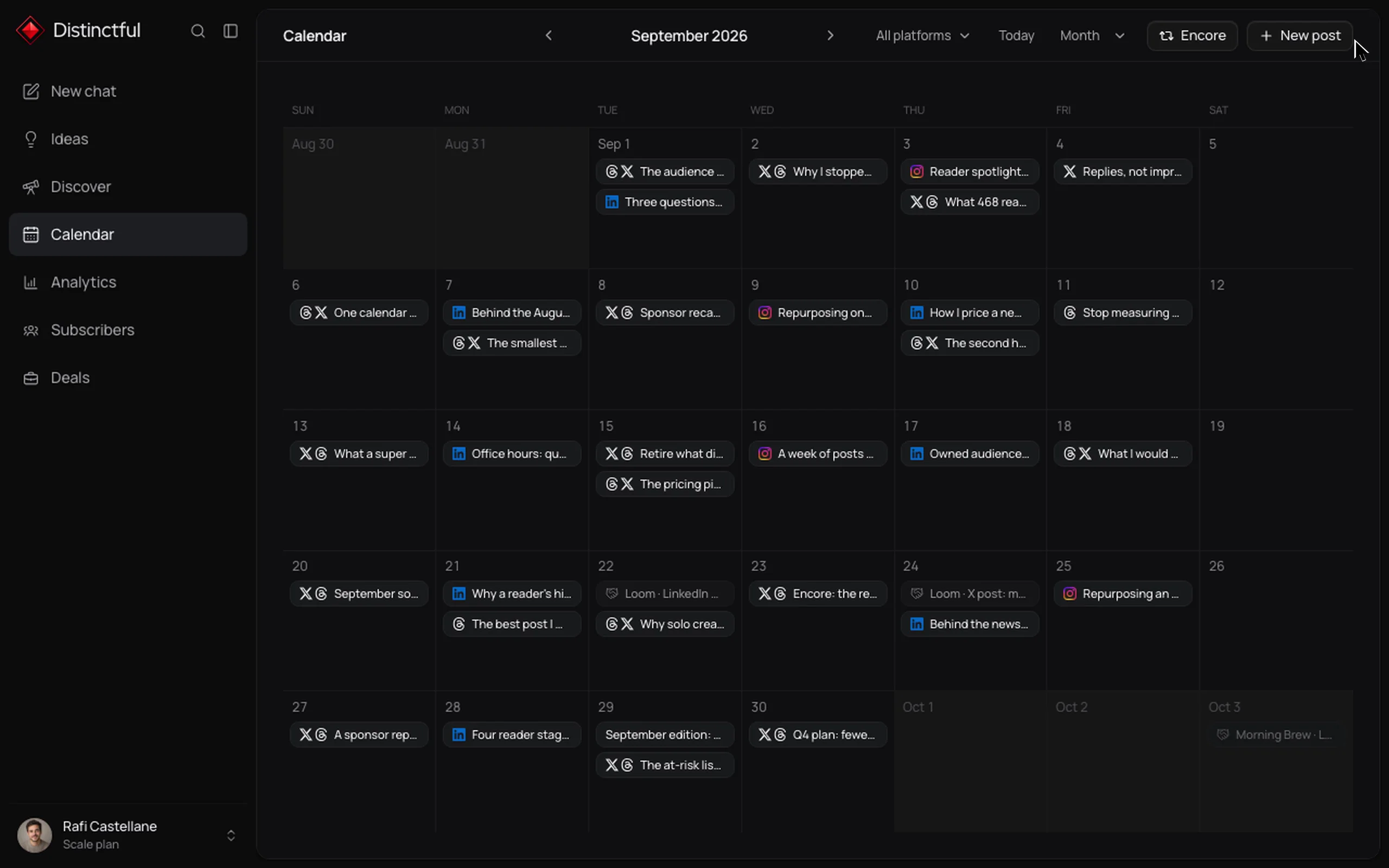
- Start a trial and connect X. Start a Grow or Scale trial, open Settings, connect X, and approve read and write access, which scheduling needs.
- Write a post or a thread. Write a single post, or add posts to the same draft to make a thread. The composer counts characters the way X does, with links at 23 and emoji at 2.
- Attach media. Add up to four images or one video to each post.
- Pick a time and schedule. Distinctful publishes the whole thread in order at the time you pick and records every publish outcome, including failures.
- Review the results. Open Analytics to see the engagement X reports for posts Distinctful published.
Drafts, including ones the AI writes for you, wait on your calendar until you schedule or publish them. X publishing is included on every plan. Grow is $49 a month, or $39 a month billed yearly, with 12 social accounts; Scale is $99 a month, or $79 billed yearly, with 25. Both start with a 14-day free trial (pricing). The limit to know: there is no free plan.
If you would rather ask an assistant to schedule for you, see whether ChatGPT or Claude can schedule social media posts.
Which option fits you?
- You post on X only, now and then: X Pro if you already pay for Premium+, or Buffer's Free plan if one scheduled thread at a time is enough.
- You write threads often: Typefully or Buffer, and check each tool's thread length against your longest thread.
- You want reports beside the plan: Metricool, budgeting for the X add-on per account.
- You run X beside several networks for a business: Distinctful, if you want the week planned and drafted from your offers and results before anything is scheduled.
Whichever you pick, schedule one real thread first and check the live post on X after it goes out.
Questions
Can you schedule posts on X without another tool?
Yes, in two places X documents. X Pro lets you schedule posts and see them in a Scheduled column, and X's help center lists access to X Pro as a Premium+ feature. The X Ads Composer at ads.x.com also schedules posts. X's help center notes you currently cannot schedule a longer post on web, and the pages we checked do not document scheduling a thread natively.
Which social media schedulers still support X?
As of October 29, 2026, Buffer, Metricool, Hootsuite, Typefully, SocialBee, Publer, and Distinctful document X support. Metricool charges a $10 a month add-on per X account on Starter or higher, and Publer supports X only on paid plans. Later ended X support on August 28, 2025.
Does Later still support X (Twitter)?
No. Later's help center says it removed support for X on August 28, 2025. It stopped new X connections on July 30, 2025, and posts scheduled for August 28 or later did not publish.
Can you schedule an X thread for free?
Buffer's Free plan schedules X threads, one at a time per queue, with up to 25 posts each. Typefully's Free plan includes scheduling with a 10 posts a month limit. Distinctful has no free plan; X threads are included on every plan after a 14-day free trial.
How long can a scheduled X thread be?
It depends on the tool. Buffer allows up to 25 posts in a thread, Typefully says X accounts can publish up to 50, and Metricool lists threads of up to 80 posts. Each post still follows X's 280 character limit unless the account has X Premium.
One draft, every platform.
Distinctful turns one idea into native posts for LinkedIn, X, Instagram, Threads, Bluesky, and YouTube, with a live preview for each, so publishing everywhere stops being a second job.
Related posts
Reschedule Social Posts With AI When a Launch Moves
Reschedule social posts with AI by reading the queue, approving exact changes, and checking saved times. Follow a launch-delay example without duplicates.
How to Verify AI-Scheduled Social Posts Were Published
Verify AI-scheduled social posts by checking each account's saved status and live URL, then resolve failed destinations without duplicating successful posts.
How to Review AI Social Posts Before Scheduling
Review AI-generated social posts by checking sources, voice, platform fit, and the exact version approved for publication. Use three worked editing examples.