How to Track Newsletter Signups From LinkedIn
Track newsletter signups from LinkedIn with separate tagged links for post, Contact Info, and Featured placements, then confirm your provider stores the values at signup.
Send every LinkedIn promotion to one newsletter landing page, tag each link with the same source, medium, and campaign, and change only utm_content to separate the post link from your profile placements. Then read LinkedIn link visits, tagged landing-page visits, and completed signups as three separate measurements.
Start with one link and one test signup. The useful result is a verified path from the link to the stored subscriber record.
The three links to build first
Copy these, replacing the domain and campaign name:
https://example.com/newsletter?utm_source=linkedin&utm_medium=organic_social&utm_campaign=weekly_newsletter&utm_content=post_2026_08_20
https://example.com/newsletter?utm_source=linkedin&utm_medium=organic_social&utm_campaign=weekly_newsletter&utm_content=profile_contact_info
https://example.com/newsletter?utm_source=linkedin&utm_medium=organic_social&utm_campaign=weekly_newsletter&utm_content=profile_featured
| Parameter | Value | Job |
|---|---|---|
utm_source |
linkedin |
Groups tagged traffic from LinkedIn |
utm_medium |
organic_social |
Keeps the unpaid channel consistent |
utm_campaign |
weekly_newsletter |
Groups the promotion you want to review |
utm_content |
post_2026_08_20 |
Separates the placement |
Hold the first three stable across every LinkedIn placement. Change only the fourth. For the full naming method, see UTM tracking for newsletter promotion; this article covers the LinkedIn decisions.
Why each placement needs its own label
LinkedIn gives you three distinct surfaces for a signup link, and they represent different reader behavior. One tagged URL across all three throws that away.
The post link (post_2026_08_20) belongs in a post that delivers a complete idea on its own. "Subscribe to my newsletter" with no argument attached gives the tracking system nothing to evaluate. LinkedIn's post analytics documentation says members can see visits to external links in a post, including repeat clicks, and that these figures are estimates. Read it as LinkedIn's account of link activity, never as a subscriber count.
The Contact Info link (profile_contact_info) is evergreen. LinkedIn allows up to three website links there, added through View Profile, then Contact info, then Edit, then Add website (LinkedIn). A reader often finds a post, visits your profile, and subscribes from here without ever touching the link in the original post. That is a different journey and deserves a different label.
The Featured link (profile_featured) sits in a section that accepts external website links alongside posts, articles, and uploaded media (LinkedIn). Feature the landing page or a strong edition with an obvious signup path.
Keep Featured and Contact Info separate. They occupy different real estate and answer different questions about how your profile is working.
Keep the campaign name off the placement
The common mistake is naming the campaign after the surface:
utm_campaign=linkedin_post
utm_campaign=linkedin_profile
That hides the fact that both links serve one promotion. Placement belongs in utm_content; the campaign names the initiative.
| Link | Campaign | Content |
|---|---|---|
| Weekly post | weekly_newsletter |
post_2026_08_20 |
| Contact Info | weekly_newsletter |
profile_contact_info |
| Featured | weekly_newsletter |
profile_featured |
Google's UTM guidance recommends a standardized convention and notes these values are case sensitive, so LinkedIn and linkedin split into separate rows. Stay lowercase. For a launch, swap weekly_newsletter for a stable label like pricing_edition, and never rename it between the post and the profile link.
Test each link before you publish it
Do not ship three links and discover a month later that the form stripped every parameter.
For each placement, open a fresh private window, visit the tagged link, confirm the parameters survive any redirect, then subscribe with an email address you have never used. Check the visit in your site analytics, then open the new subscriber record in your provider and note exactly which values landed. Use a new address each time. Providers can retain acquisition data across a session, so reusing one browser produces misleading results.
Three outcomes, three different reports you are entitled to write:
- Visit and subscriber both carry the values. Compare tagged visits against tagged signups.
- Only the visit carries them. You have aggregate traffic evidence and no subscriber-level source.
- Neither does. Fix the landing page or form before trusting the campaign at all.
What your provider stores matters as much as the link. Kit records all five UTM fields for signups through a Kit Form or Landing Page, breaking down visitors, subscribers, and conversion rate by source, medium, campaign, term, and content (Kit), though subscribers you import or create through the API generally carry no attribution (Kit). Beehiiv documents acquisition by source, medium, and campaign. Confirm the placement-level utm_content split on your own account before building a routine on it.
Never backfill a missing value with what you assumed happened. Missing data describes the path and should stay visible.
Why the numbers never reconcile
The useful report is a small table, not a blended score:
| Measurement | Source of truth | What it means |
|---|---|---|
| Post impressions | Estimated displays of the post | |
| External-link visits | Recorded visits to links in that post, including repeat clicks | |
| Tagged landing-page visits | Site analytics | Recorded visits that arrived with the campaign values |
| Completed signups | Newsletter or form provider | Subscriber records created through the form |
| Engaged subscribers | Newsletter provider | Provider-reported activity after signup |
These measurements need not move together or reconcile. In an illustrative example, a post reports 40 external-link visits, analytics records 34 tagged visits, and the provider records 6 signups. The difference does not establish six lost visits or six LinkedIn-caused subscribers.
| Symptom | Likely cause |
|---|---|
| LinkedIn count exceeds tagged visits | Repeat clicks, privacy controls, in-app browsers |
| Tagged visits but no source on subscriber | Redirect or form dropped the parameters |
| Signups with no campaign at all | Link shortener, copied URL, or a later direct return |
| Profile signups you cannot place | Post view followed by a Contact Info or Featured click |
Each tool records a different event. Keep them separate and treat the gaps as diagnostics.
When both your site and provider keep the campaign, calculate:
tagged signup rate = LinkedIn-tagged signups / LinkedIn-tagged landing-page visits
Use landing-page visits as the denominator, never impressions. An impression does not mean anyone read the post or saw the call to action. Hold the time window steady too, and review the evergreen profile links separately from a post that does most of its work in 72 hours.
A worked review in Distinctful
First complete the test signup above in the newsletter provider. Then use Distinctful to inspect the subscriber information that provider makes available. Grow and Scale provide full synced reader access within their limits, and a test address only appears after the provider sync that includes it, so a missing test address right after signup is not proof that the signup failed:
- Connect Beehiiv or Kit in Settings → Integrations and allow the import to complete. The Beehiiv integration and Kit setup guide describe the connections.
- Open Subscribers, select the publication where needed, and search for your test email address. Check Subscribed and the available Source value.
- Open the reader's detail panel. Campaign appears when that information is present; the detail layout also depends on your plan. Compare it with the original record in your provider.
- If a Source filter is available, inspect its actual values before using it to group readers. Distinctful displays the provider's channel value here, not a guaranteed copy of
utm_source. A link taggedlinkedindoes not guarantee a LinkedIn filter option. - On Home, use Subscriber growth to review 30D or 90D movement. Keep LinkedIn's post-link metrics in LinkedIn and placement-level UTM checks in your provider or site analytics.
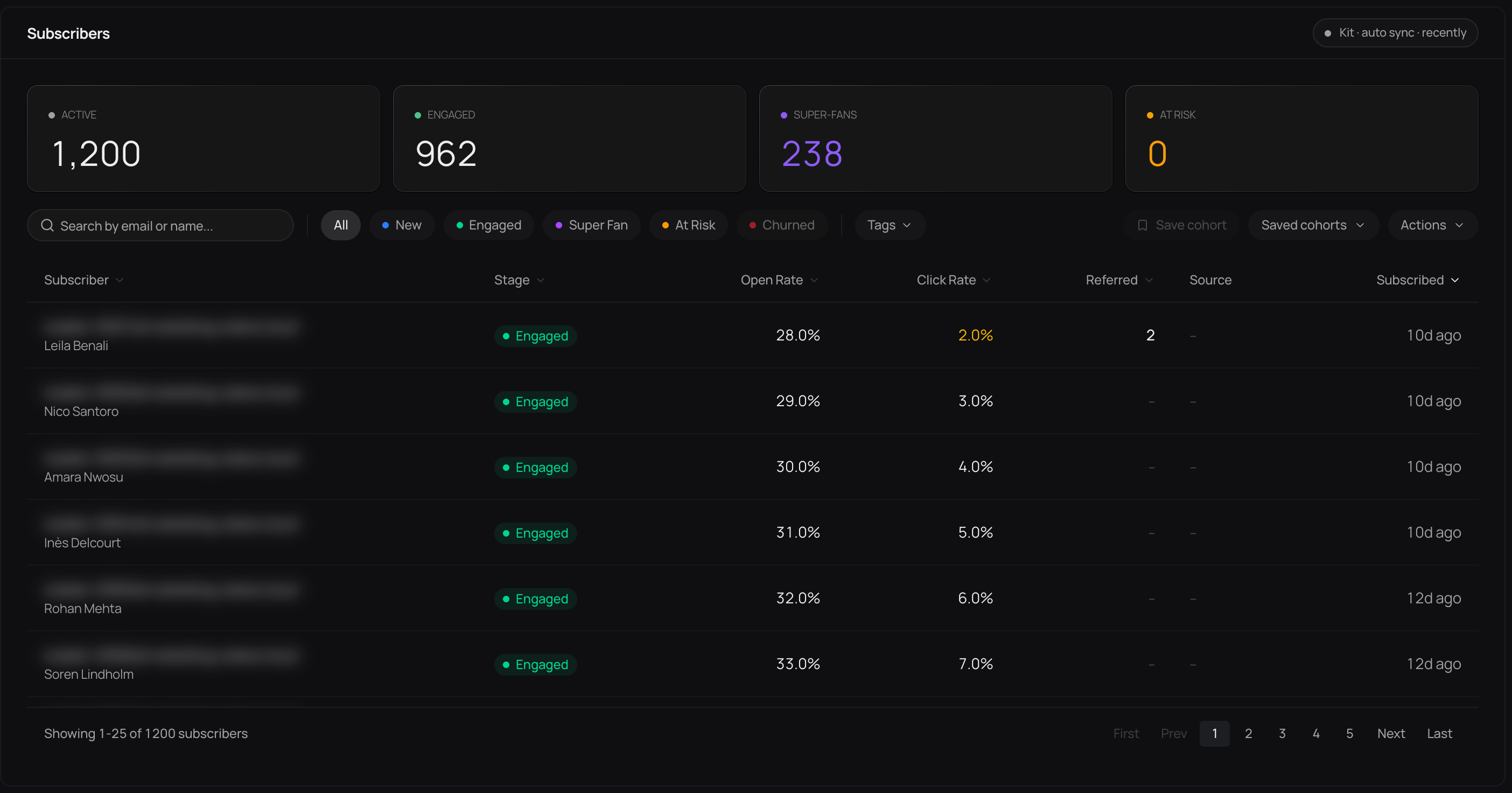
Interface illustration, not results from this walkthrough. The Source cells shown are empty; this image demonstrates where to inspect records, not successful LinkedIn attribution.
If source data is missing, keep it missing in your report. The reader panel may display “Organic” as a fallback; that label alone is not evidence of organic acquisition. Distinctful does not expose a post-versus-profile utm_content report, so preserve that comparison in the tool where you verified it.
Calculate one result without filling the gaps
The following numbers are invented solely to demonstrate the calculation. Assume a seven-day window, the same landing page, and a provider test that confirmed all three placement labels survive.
| Placement | Tagged landing-page visits | Tagged signups | Signups / visits |
|---|---|---|---|
| Post | 80 | 8 | 10% |
| Contact Info | 20 | 3 | 15% |
| Featured | 10 | 1 | 10% |
| Total | 110 | 12 | 10.9% |
The combined rate is 12 / 110 × 100 = 10.9%, not the unweighted average of the three rates. Contact Info has the highest observed rate in this small example, but three signups are too few to establish a durable advantage. Repeat the same measurement window before changing the publishing plan.
Record one remaining question alongside the table: did any placement lose its label, did a sync finish late, or did a later direct visit hide the original path? That question determines the next test.
Run four cycles before you conclude anything
One post is far too noisy to set a strategy. Run the same system for four promotion cycles: publish one native post from the edition's strongest idea, give it a post-specific content value, leave the profile links untouched, and record LinkedIn visits, tagged visits, and signups after the same number of days each time.
Then look for what repeats. Do story-led posts out-pull list posts? Does the profile keep producing signups in quiet weeks? Which topics appear near signups whose later clicks or other provider-reported activity merit a closer look? Where do the values vanish? Each answer should produce one next test, not a permanent verdict about LinkedIn drawn from a handful of signups.
Five mistakes that waste the effort
Reusing one tagged URL everywhere. If post, Contact Info, and Featured share a content value, the placements are indistinguishable forever after.
Varying capitalization. linkedin and LinkedIn become separate rows. Keep a shared sheet and stay lowercase.
Reading link visits as signups. LinkedIn reports link activity; your provider reports subscriber records. Different events entirely.
Scaling before one link works. A single fully tested link beats fifty detailed ones whose parameters die at the form.
Confusing a LinkedIn newsletter with an email newsletter. A LinkedIn newsletter lives on LinkedIn with its own subscriber analytics. This guide covers promoting an email newsletter on Kit, beehiiv, or similar. Different audience, different analytics, different signup path.
And the quiet one underneath all of them: a tag records the visible path that survived, not everything that came before it. Someone may read six posts, search your name a month later, and finally use the profile link.
Where this fits
Good LinkedIn promotion starts with an idea worth reading, not a tracking link. Pull the core argument or strongest story from the edition, rewrite it natively, and let the link offer the deeper version. The full workflow is in how to repurpose newsletter content for social media.
Distinctful runs that publishing system across LinkedIn, Twitter (X), Threads, and Bluesky, keeping provider-reported newsletter activity beside the publishing history. The campaign label adds context; it never becomes a causal score.
Build two links today: the next post and Contact Info. Test both through a real signup. Once the values survive, add Featured and hold the convention for four cycles.
What this cannot tell you
- LinkedIn post analytics are aggregate estimates and may include repeat external-link clicks.
- A preserved LinkedIn campaign value identifies the tagged path used, not every exposure that influenced the signup.
- Copied links, private sharing, cross-device returns, redirects, in-app browsers, and privacy controls create gaps between LinkedIn and newsletter reports.
- Provider attribution covers signups through the forms that provider tracks. Imported and API-created subscribers usually carry none.
Questions
How do I track newsletter signups from LinkedIn?
Tag your newsletter landing page URL with linkedin as the source, organic_social as the medium, and a stable promotion name as the campaign. Use the content field to separate post and profile placements, then verify with a test signup that your analytics and provider store the values.
How many links can I put on my LinkedIn profile?
LinkedIn allows up to three website links in the Contact Info section, added through View Profile, then Contact info, then Edit, then Add website. The Featured section gives you additional placement for external links alongside posts and media.
Does LinkedIn show who clicked my newsletter link?
LinkedIn reports aggregate visits to external links in a post, including repeat clicks. It gives you no reliable identity-level match between a post viewer, a landing-page visitor, and a subscriber.
Why do LinkedIn link visits and newsletter signups not match?
A visit is not a signup, repeat clicks inflate the LinkedIn total, privacy tools and in-app browsers block tracking, redirects strip parameters, and people return later by another route. They are different steps, not records that should reconcile.
Can a UTM link prove that LinkedIn caused a newsletter signup?
No. It shows that a recorded visit or signup carried a LinkedIn label. The reader may have seen other posts, referrals, or direct visits first, so the label is evidence about the tagged path rather than proof of motivation.
Review the readers behind your signup counts
See how provider-reported subscriber activity appears in Distinctful, including what source and engagement fields can tell you.
Related posts
Best Schedulers for Instagram, LinkedIn, X, and Threads
Choose a scheduler for Instagram, LinkedIn, X, and Threads by account type, post format, publishing method, and total cost. Compare five options for solo work.
How to Export LinkedIn Connections and Social Followers
Export LinkedIn connections through your data settings, then check what the file contains. Compare X, Threads, and Bluesky backups without building a spam list.
Why Do My Posts Reach So Few Followers?
Your follower count does not guarantee reach. Learn how ranked feeds work, read views without confusing them with people, and plan what to change next.