High Opens, Low Clicks: What Your Newsletter Is Telling You
A worked review of newsletter opens, clicks, and reader history that separates measurement problems from questions about the content and its next step.
High opens and low clicks are a starting point for investigation. They do not establish that your subject line worked, that the email disappointed readers, or that your list is disengaged.
Start with the job of the edition. A complete essay and an invitation to book a workshop need different kinds of response.
Check what the two numbers count
An open generally depends on a tracking image loading. A click records a link request. Mailchimp documents that automation and privacy features can affect these metrics and recommends reviewing bot filtering. Clicks are not a guaranteed count of deliberate human decisions.
Record the provider, time window, unique-versus-total definition, and filtering setting. Check whether “click rate” divides by deliveries or opens using the CTR and CTOR example. A change in measurement can make two otherwise similar sends look different.
Work through a small comparison
Illustrative review, not measured results: the same publication reports the following counts seven days after each send. All three use unique clickers divided by delivered emails.
| Edition | Delivered | Measured open rate | Unique clickers | Click rate | Intended action |
|---|---|---|---|---|---|
| A: complete essay | 1,000 | 60% | 10 | 1.0% | Read the argument in the email |
| B: checklist | 1,000 | 61% | 30 | 3.0% | Download the checklist |
| C: workshop | 1,000 | 62% | 12 | 1.2% | Review workshop details |
Edition C recorded 18 fewer clickers than B. That observation does not explain why. The offers, wording, and reader needs differ. Edition A's lower rate is not automatically a failure when the essay contains what it promised.
For the workshop edition, make the next check concrete:
| Check | What to inspect | What it can resolve |
|---|---|---|
| Destination | Open the link on a phone and desktop | A broken page or an unexpected sign-in requirement |
| Promise | Read the subject, opening, and link text together | Whether the same workshop is described throughout |
| Relevance | Review actual questions and replies where available | A specific objection or missing detail |
| Coverage | Compare provider counts and filtering settings | Whether the reports describe equivalent events |
Do not turn a possible explanation into a diagnosis before checking it. “Readers are not interested” is a much larger claim than “twelve recipients registered a click.”
Inspect the connected subscriber records
Use Distinctful when you want to move from an edition summary to the reader information available from your provider. Grow and Scale provide full synced reader access within their limits, so search and filters cover every synced reader.
- Connect the publication in Settings → Integrations and resolve any import or reconnect notice.
- Open Subscribers and select the relevant publication where needed.
- Use Stage to narrow the list, then inspect Open rate, Click rate, and Subscribed. Compare records with enough send history to make the numbers useful.
- Open a reader to inspect the available history and engagement details. Field availability depends on the provider, plan, and imported records. An absent event does not establish that no activity occurred.
- Cross-check a consequential conclusion in your newsletter provider. For example, Kit's subscriber profile has an Email History tab. Newsletter providers can expose reader-level information too.
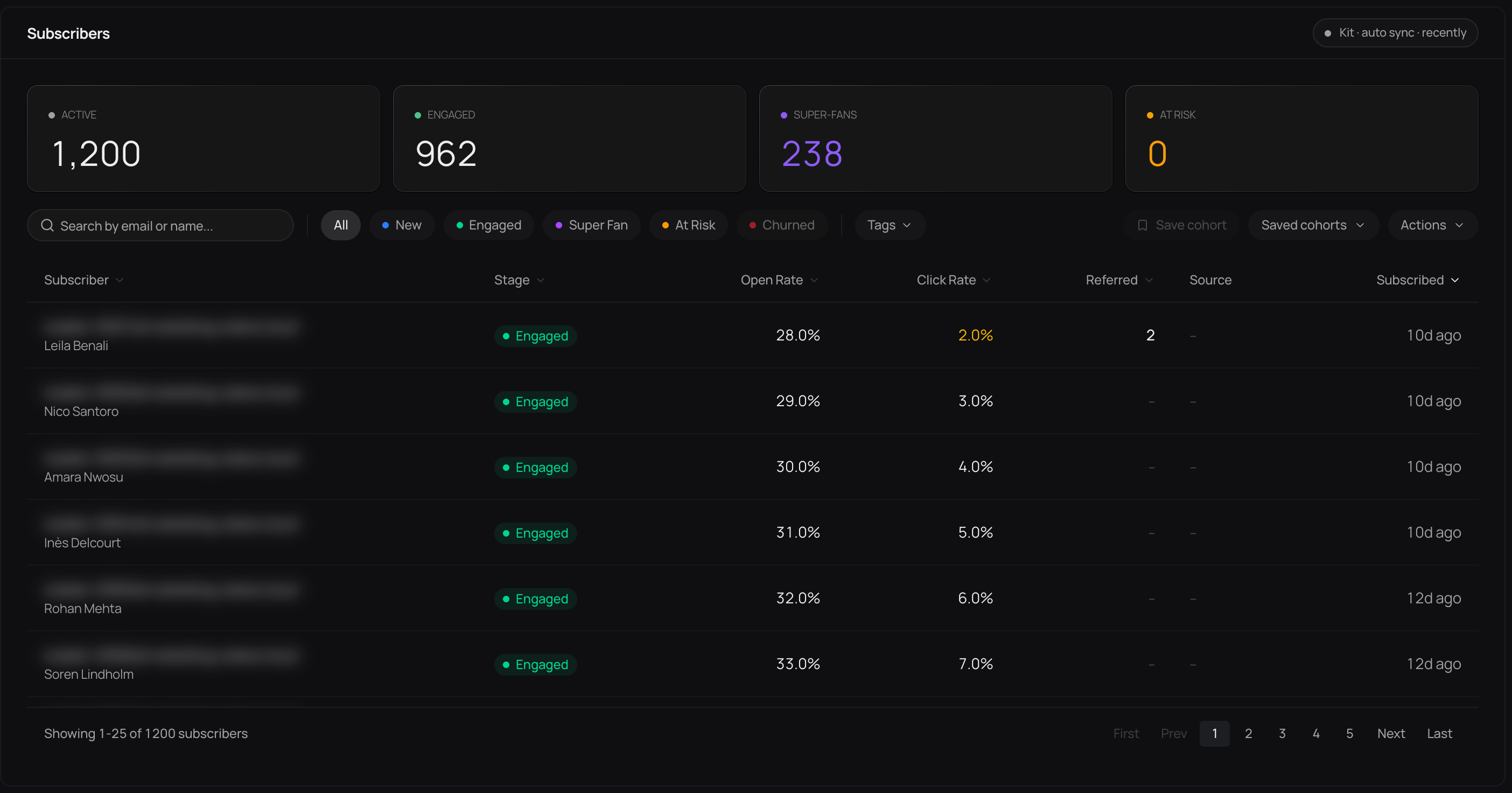
Interface illustration with sample subscriber records. Stage and reported rates help choose what to inspect; the screenshot does not identify dissatisfied readers or prospective customers.
Some history counts are approximated from rates and sends. A nearby edition associated with an open or stage change can be inferred from timing, not an observed match.
A reader who recently subscribed has had fewer opportunities to engage. A reader with no measured opens may use a client that blocks images. Neither observation alone justifies deleting them, changing their subscription, or assuming they ignored you.
Run one useful next test
For the workshop example, suppose the destination works but the link text only says “learn more.” A reasonable next version names what is behind the link: the workshop topic, date, and who it is for. Keep the other conditions as comparable as practical and record the reporting window before sending.
If you run an A/B test, use the provider's supported test setup and assess whether the sample can distinguish the effect you care about. If you compare successive editions, describe it as an observational comparison: the time and topic changed too.
Write down the result and what remains uncertain. Distinctful keeps reader and publishing context nearby; your newsletter provider still sends the email and supplies the underlying report. Use that record to choose another test, not to declare a universal rule about subject lines or readers.
What this cannot tell you
- A high open count does not prove that a subject line earned human attention. A click can also come from automated software.
- A pattern across several editions can justify another check, but cannot identify the cause by itself.
- Subscriber stages describe recorded engagement. They do not establish who read an entire edition or who is ready to buy.
Questions
What does a high open rate with a low click rate mean?
It means the report recorded relatively more opens than clicks under its definitions. Check tracking and bot filtering, then whether the edition needed a click, whether the link worked, and whether its promise was clear. The rates alone cannot identify the cause.
Is a high open rate with low clicks always a problem?
No. An edition that gives its full value inside the email may need no external click. If it promises a download, booking, or purchase, investigate that specific next step rather than treating every newsletter as the same kind of send.
Does a high open rate prove the subject line works?
No. Image loading, privacy features, client behavior, and tracking settings affect measured opens. Human interest is one possible explanation, not something the rate establishes on its own.
How many sends do I need before drawing a conclusion?
A few comparable editions can reveal questions worth testing, but there is no universal four-send or six-send proof threshold. Audience size, click counts, content, timing, and measurement changes all affect what you can conclude.
What should I change first?
Check the link destination and the intended action first. Then choose one change that addresses a specific observation, such as clearer link text. Compare equivalent reporting windows and avoid changing the subject, audience, offer, and timing all at once.
Related questions
Inspect the reader history behind a headline rate
Follow the subscriber walkthrough to review reported activity and its limits before deciding what to change.
Related posts
What Is a Good Newsletter Unsubscribe Rate?
A good newsletter unsubscribe rate is usually under 0.5% per send, near Mailchimp's 0.22% average. Learn how to calculate it and when a spike is a problem.
How to Analyze Your Newsletter Data With an AI Agent
Five prompts that turn ChatGPT or Claude into a newsletter analyst, what to export from beehiiv or Kit first, and the four questions an AI cannot answer no matter how you word them.
The Best Time to Send a Newsletter (And Why the Data Disagrees)
Kit says Tuesday 10 a.m. MailerLite says Thursday 9 a.m. beehiiv says Tuesday through Thursday. Three providers, three answers, and the lever that beats all of them.